Finding datasets
About datasets
Datasets are collections of organised and structured data that are used for analysis and research purposes.
They provide raw material for analysis, allowing researchers to test hypotheses, validate findings, and draw conclusions based on evidence.
Finding datasets
Steps for an effective dataset search
Identify your data needs
What information do I need? This could include required fields, information about the spatial or temporal coverage of the data, or a description of any processing or modifications that have been made to the data.
Which file format(s) am I able to work with? If you are planning on analysing data using specific software, ensure that you know the file formats that can be used with that software.
Are there any reuse licences that are incompatible with how I will use the data? For instance, if you plan on commercialising your research, then you should avoid datasets that stipulate a non-commercial condition in their reuse licence.
Search
Search for datasets using one of 3 strategies, listed below in order of easiest to most complicated:
- Strategy 1: Google’s Dataset Search (link to Dataset heading below)
- Strategy 2: Data repositories and archives (link to heading below)
- Strategy 3: General internet search (link to heading below)
Assess what you find
After you've found a dataset that you think might be useful, assess it for relevance, understandability and trustworthiness.
Relevance
Use the metadata associated with the dataset to make sure it meets the criteria that you established before you started searching. Check that:
- the coverage of the dataset is sufficient for your needs
- the file format is compatible with the software that you plan on using for analysis
- the reuse licence permits the activities for which you will use the data.
Understandability
Look for documentation that describes the dataset. To be understandable and usable, a dataset must include:
- definitions for any technical terms, data codes or variables used
- details of data collection procedures
- description of data processing methods, including both the cleaning and analyses that were undertaken.
After reading the documentation, you should be able to understand what information is contained in the dataset and what can and cannot be done with the data.
Trustworthiness
Consider the reliability of the data and the source. Ask yourself:
- Has the data been produced by a reputable source, such as a well-known organisation or researcher active in the field?
- Is there enough descriptive information about the data to demonstrate that data collection and processing was trustworthy?
- Was the data produced according to current best practices, or were outdated collection and analysis methods used?
Search strategies
Dataset Search
Dataset Search is a tool by Google that allows you to find datasets located across the web using a simple keyword search. It’s easy and familiar to use, and accesses a wide range of data sources.
Any web pages that use specific structured metadata to describe datasets, such as schema.org, will be findable by Dataset Search.
How to use Dataset Search
- Type your search terms into the search box. Search results will appear on the left side of the page.
- Filter search results by date, format, licence/usage conditions, topic, and by whether it is freely available.
- Click on a result to get more information. The buttons under the dataset title will take you to the dataset location.
Dataset Search limitations
- Only datasets using specific metadata will be found using Data Search. If a dataset is available on a website, but the page doesn’t include the metadata fields that Dataset Search is looking for, then it won't be found. Alternative methods will be needed to find these datasets.
- There is no advanced search interface to help narrow down your results. Some of the techniques used to refine regular Google searches will also work in Dataset Search, such as using the AND and OR operators, or site: to limit your search to a particular site or domain.
- Note: The information displayed on each dataset varies depending on how much metadata was available. Datasets may be available through multiple locations and links. Not all datasets in Dataset Search will be openly accessible.
Data repositories and archives
Data archives or repositories from reputable institutions, such as governments, research bodies or universities, can be great places to find high-quality data. Search these directly for the data you require.
Registry of Research and Data repositories (re3data.org)
- Visit the re3data.org, which contains material from various academic disciplines. For additional access visit:
- The FAIRsharing directory
- The Directory of Open Access Journals (DOAJ)
- Browse by Subject or Search and filter results by topics.
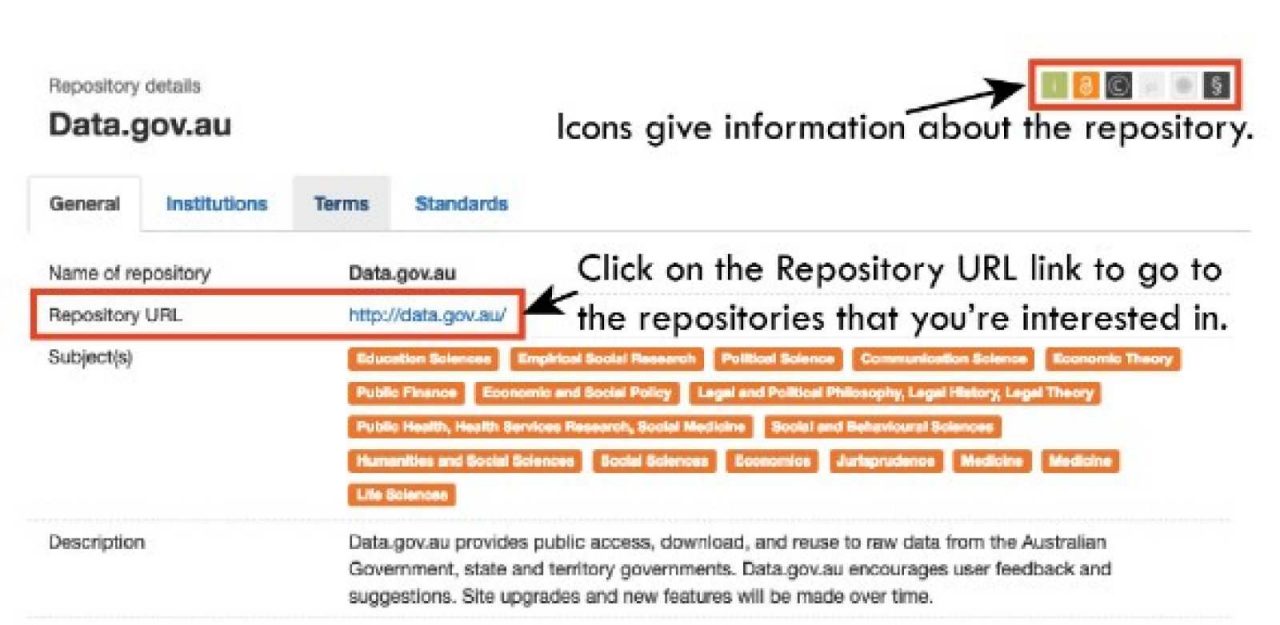
- Results will include:
- A general description of the repository
- Subject areas that it relates to
- Whether data in the repository is openly available
- Whether terms of use or reuse licences are specified for datasets in the repository.
A result in the Registry of Research and Data repositories will look something like this:
Find repositories and archives using a search engine
Use a search engine to find data archives and repositories across the internet. Use relevant keywords and the terms “data repository” or “data archive” in your search to get the most relevant results.
Example search
vegetation AND data AND (repository OR archive)
=> returns results that include:
European Vegetation Archive
NASA Normalized Difference Vegetation Index (NDVI) images
NSW SEED data portal
among others.
Use search operators, such as “and” and “or”, along with advanced search interfaces to refine and filter your search.
General internet search
Sometimes datasets are available through personal websites, or through sites related to research groups or projects.
Use keywords and search operators, such as “and” and “or”, to create a search. Where possible, use advanced search interfaces to control your search.
Example search
netCDF climate data
=> returns results that include:
UCAR Climate Data Sets
Globally Downscaled Climate Data
NOAA/NSIDC Climate Data Record
among others.
Be aware that you may find poor or uncertain quality datasets, as well as many irrelevant results.
Related information
Contact
We're here to help, online and in-person